


Automating a poorly understood process speeds up the errors. Doing it with a clear process frees up hours, reduces failures and leaves a record of what happened. The work is in deciding what to automate first.
Signs it is worth it
A good candidate shows several of these signs:
- It repeats several times a week and always follows the same steps.
- It depends on copying data from one system to another, on a spreadsheet somebody updates on Mondays or on emails somebody forwards.
- It produces human errors that have to be fixed later, like a mistyped figure or a forgotten step nobody notices until the customer complains.
- It makes another person wait, for example with an approval stuck in an inbox.
- It needs traceability: who did what, when and with what result.
To put numbers on the decision, do a quick calculation: minutes per run, times the runs per month, times the hourly cost of whoever does it. If the result does not clearly exceed the cost of building and maintaining the automation, wait.
One example: we automated the segmented sending of offers to a lead base and its tracking in dashboards (see the case study). It was repetitive work with clear rules that called for traceability of every send.
When it is better to wait
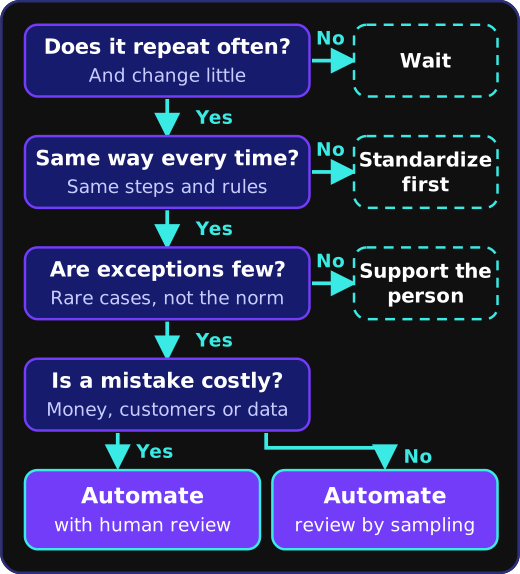
If the process changes every week, automating it today means rebuilding it next week. If everyone does it differently, agree first on how it should work. Processes that happen a few times a year rarely repay the cost of building and maintaining them, and when exceptions are the norm, the useful move is to support the person with better tools instead of replacing them.
A method in stages
- Map the process as it happens today, exceptions included. That map often shows steps that should not exist.
- Remove those steps before writing a line of code, because automating an unnecessary chore is the worst waste of effort there is.
- Automate in stages, starting with the most repetitive and least risky part, and keep human review wherever there is any doubt.
- Measure before and after: how long the cycle took and how many errors there were.
Common mistakes
The first is automating chaos, which produces chaos that is harder to see. The second is forgetting maintenance: integrations depend on systems that change, and someone has to watch them and find out when they fail. The third is leaving error handling undecided. A good flow retries or alerts a person, and as a last resort stops without leaving half-written data. The fourth, maybe the most common, is having no owner. An automation with no owner degrades silently until somebody notices it has not worked for weeks.
Where technology comes in
Today you can also automate tasks that used to call for reading and judgment, like classifying documents or drafting replies for review. The method stays the same: start small and measure as you go.
Bring one process and a typical week of it. Write to us and we will run it through these questions in a short call. What we automate is described in the process automation service.