


The only version that should reach production is the one that went through the pipeline. A team of four that deploys by hand on a Friday at five o'clock already knows why: somebody forgets a step, the release goes out with a wrong variable and the weekend disappears into fixes. The pipeline makes the process repeat the same way every time.
Start with the minimum that protects you
The first pipeline should do only three things. Build the project from scratch on a clean machine, run the automated tests and package the result into an artifact, which can be a Docker image or a package ready to deploy. With that, "it works on my machine" stops being a defense.
In Azure DevOps this lives in an azure-pipelines.yml file inside the repository, so the pipeline is versioned, reviewed in a pull request and travels with the code. A skeleton for a Node project with Docker looks like this:
trigger:
  branches:
    include: [main]

pool:
  vmImage: ubuntu-latest

steps:
  - script: npm ci
    displayName: Install dependencies
  - script: npm test
    displayName: Tests
  - script: docker build -t myapp:$(Build.BuildId) .
    displayName: Build image
It installs, tests and builds the image. Pushing the image to a registry and deploying are the next steps.
Branch policies do the boring work
Policies on the main branch require that every change goes through a pull request, that the pipeline finishes green and that at least one person reviews it. Setting it up takes minutes and removes the mistake that repeats most often in small teams, changes pushed straight to main.
One catch in the skeleton above: that trigger runs after the merge. To validate every pull request too, add the pipeline as a build validation policy on the main branch (Repos > Branches > Branch policies > Build validation). Without that policy, a green pipeline is a habit and not a barrier.
Deploying by environment
When the same image moves from development to testing and from there to production, you verify what is actually going to run.
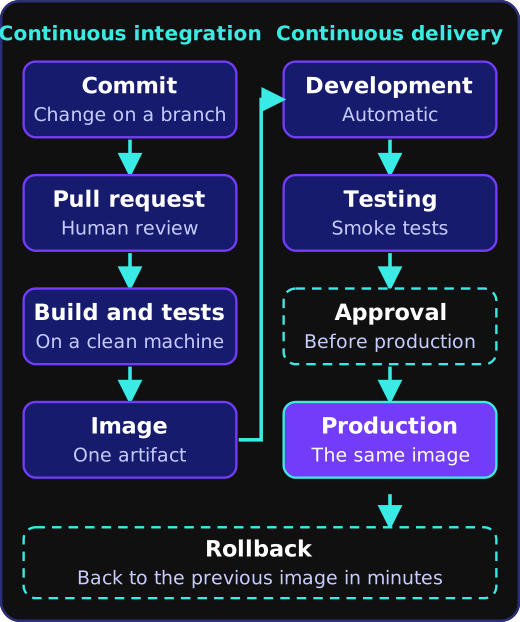
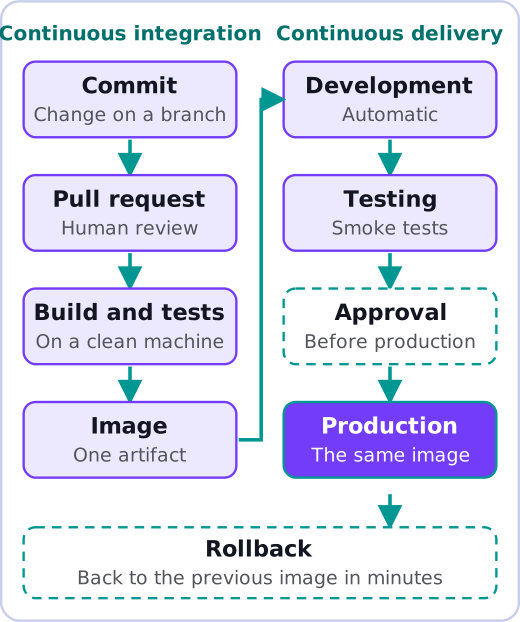
Configuration that changes between environments, such as connection strings and keys, lives in secret pipeline variables, in variable groups or in a manager like Azure Key Vault, never in the repository. For production a manual approval before deploying makes sense, at least while the team builds confidence. In Azure DevOps you set it as an approval on the production environment. The deployment stage declares that environment, and the approval is configured on it (Pipelines > Environments > Approvals and checks):
stages:
  - stage: Build
    jobs: [...]   # the steps shown above
  - stage: Prod
    dependsOn: Build
    jobs:
      - deployment: Deploy
        environment: production   # approval configured on the environment
        strategy:
          runOnce:
            deploy:
              steps:
                - script: ./deploy.sh myapp:$(Build.BuildId)
Here deploy.sh stands for whatever script your team uses to roll out the image.
What to add next
Once the basics work, the extras with the best return follow: static code analysis, a scan for vulnerable dependencies with npm audit, dotnet list package --vulnerable or the equivalent in your language, and automatic smoke tests against the freshly deployed environment. Validating the API contract fits here too, as explained in documenting an API with OpenAPI. Each extra gets added to the pipeline as a new step.
A rollback plan is also needed. If a deployment fails, going back to the previous image has to take minutes, and you rehearse it before you need it.
What a small team should avoid
There are two common traps: copying hundred-line pipelines from another project that nobody understands, and automating a deployment that is not even done the same way twice. Standardize by hand first.
Still deploying by hand? Tell us how you deploy today and we will build the first pipeline with you. Pipelines with Docker and Azure DevOps or GitHub Actions are part of our cloud deployment and CI/CD service.