


A web application can have every right feature and still lose users because it takes four seconds to show anything, or because nobody with a screen reader manages to finish the form. Both problems can be measured and fixed.
Three metrics that measure real experience
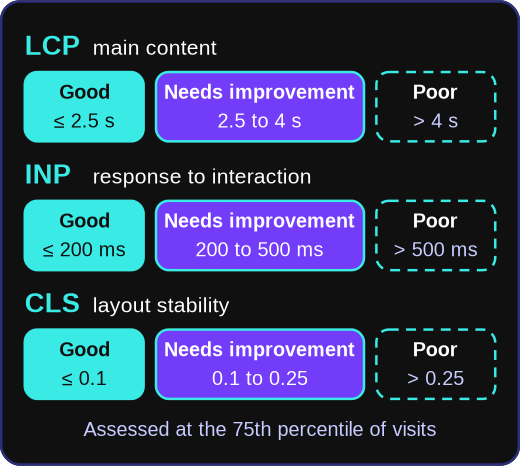
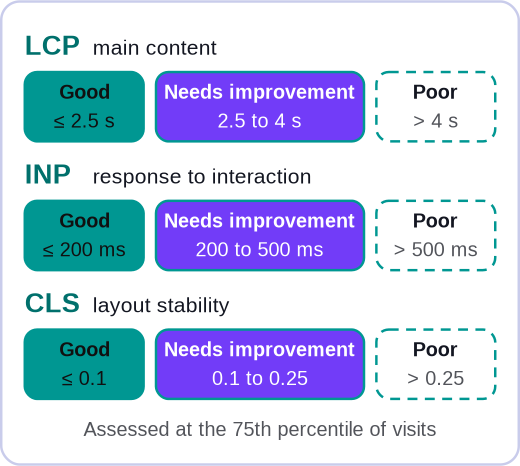
Core Web Vitals sum up the experience in three numbers, measured on real users and assessed at the 75th percentile of visits. LCP measures the time to show the main content. Good is 2.5 seconds or less, and above 4 seconds is poor. INP measures how quickly the page responds to interaction. The target is 200 milliseconds or less, and above 500 is poor. CLS measures layout shift while loading. Good is 0.1 or less, and above 0.25 is poor. Anything between the two limits needs improvement.
PageSpeed Insights and Search Console show all three from field data, although Search Console needs enough traffic to build a reliable sample. Lighthouse estimates them in the lab and uses Total Blocking Time (TBT) as a stand-in for INP, which tracks how long the main thread stays blocked during loading.
What moves LCP the most
It is almost always a large unoptimized image, a font that blocks the text or too much JavaScript before the first paint. The fix is images in the right size and format (WebP or AVIF), no lazy-loading on the main image and a high fetch priority for it. Declaring width and height will not speed up LCP, but it prevents layout shift (CLS) because the browser reserves the space:
<img src="/hero.avif" width="1200" height="600" fetchpriority="high" alt="Team reviewing an orders dashboard">
Whatever sits below the first screen can be lazy-loaded with loading="lazy".
In Angular, server-side rendering puts the main content in the first HTML response, and route-level code splitting reduces the JavaScript the browser downloads on the first page. Both help LCP.
Interactivity: less work on the main thread
A high INP usually comes from heavy event handlers or from components that re-render in full on every keystroke. Profiling with the browser's performance tools shows which long task blocks the interface and how long it lasts. The fix is moving expensive work out of the handler, for example by yielding to the main thread with scheduler.yield() (or setTimeout where it is not available) or by moving computation to a web worker, and updating only the components that change.
Accessibility you fix in code
Semantic HTML first: a <button> for actions and an <a> for navigation already come with keyboard support and screen reader behavior. Every form field needs a visible label, error messages must be announced to assistive technology and keyboard focus must stay visible at all times. Regular text needs a contrast ratio of 4.5:1 (3:1 for large text and for control borders). Catching a violation in code review saves the audit of the finished product, where fixing it means touching screens that already exist. Many of those decisions start before the code, as covered in UX design before code.
Forms and keyboard
A field with an error needs a visible label tied to it with for, and a message linked with aria-describedby so assistive technology reads it together with the field:
<label for="email">Work email</label>
<input id="email" type="email" aria-invalid="true" aria-describedby="email-error">
<p id="email-error">Enter an address like name@company.com</p>
Then go through the whole form with the Tab key and no mouse. Focus has to follow the visual order, every control has to be reachable and the focus ring has to stay visible.
Measure in the pipeline
If you already have a CI/CD pipeline, add Lighthouse CI or axe tests, which warn you when a change degrades performance or introduces an accessibility failure. A performance budget in Lighthouse CI lives in a lighthouserc.json file:
{
  "ci": {
    "assert": {
      "assertions": {
        "largest-contentful-paint": ["error", { "maxNumericValue": 2500 }],
        "cumulative-layout-shift": ["error", { "maxNumericValue": 0.1 }]
      }
    }
  }
}
If the pipeline fails on the same pull request, the change gets fixed with the context still fresh, before other changes pile up on top.
If a screen feels slow or a form cannot be used with a keyboard, tell us which one. We apply these practices in our web and frontend application service, with Angular, Astro and responsive, accessible design that follows the WCAG guidelines.